Skip to content
View in the app

A better way to browse. Learn more.

2002FAQ

A full-screen app on your home screen with push notifications, badges and more.

To install this app on iOS and iPadOS
  1. Tap the Share icon in Safari
  2. Scroll the menu and tap Add to Home Screen.
  3. Tap Add in the top-right corner.
To install this app on Android
  1. Tap the 3-dot menu (⋮) in the top-right corner of the browser.
  2. Tap Add to Home screen or Install app.
  3. Confirm by tapping Install.

About the Venue


Upcoming Events
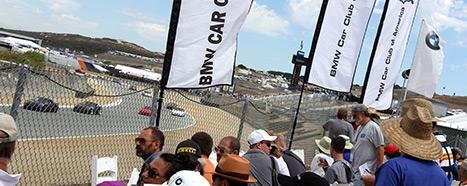
    

You’re invited to come and enjoy the corral and Hospitality above Turn 5; unwind and savor the atmosphere at the Hospitality Tent offering sweeping views of the historics racing action. The ultimate day of racing awaits you at the familiar Festorics, be around incredible vintage race cars still hot from their laps on the track; revel in the intoxicating racing smell ever present in the air. Return to enjoy Festorics hospitality with your friends and family at the annual historical races
 
Registration is Open
0 Comments · 0 Reviews

1 user has RSVPed :

Account

Navigation

Search

Search

Configure browser push notifications

Chrome (Android)
  1. Tap the lock icon next to the address bar.
  2. Tap Permissions → Notifications.
  3. Adjust your preference.
Chrome (Desktop)
  1. Click the padlock icon in the address bar.
  2. Select Site settings.
  3. Find Notifications and adjust your preference.