Skip to content
View in the app

A better way to browse. Learn more.

2002FAQ

A full-screen app on your home screen with push notifications, badges and more.

To install this app on iOS and iPadOS
  1. Tap the Share icon in Safari
  2. Scroll the menu and tap Add to Home Screen.
  3. Tap Add in the top-right corner.
To install this app on Android
  1. Tap the 3-dot menu (⋮) in the top-right corner of the browser.
  2. Tap Add to Home screen or Install app.
  3. Confirm by tapping Install.

Post LOTA FAQ Gathering at Laguna Seca

(0 reviews)

I want to welcome everyone who is enjoying the Monterey Car Week to come and spend some time with us, enjoying some food and drinks at the track after the conclusion of the Legends of the Autobahn.


There will be some food and drinks, but everyone is welcome to bring anything they wish to drink or throw on a grill.


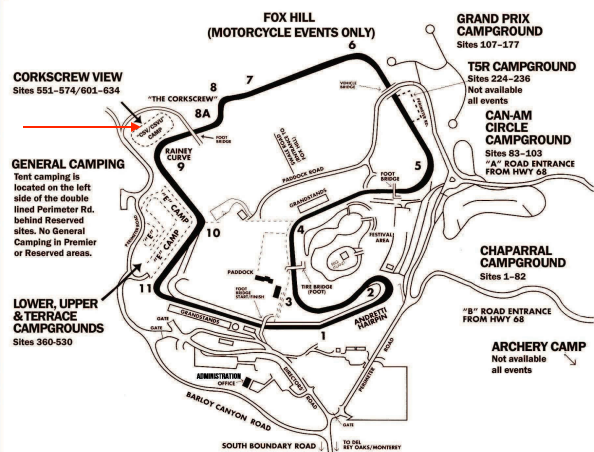
We are located at Laguna Seca CORKSCREW VIEW - SITE 568L


image.png


image.png

User Feedback

Create an account or sign in to leave a review

There are no reviews to display.

Account

Navigation

Search

Search

Configure browser push notifications

Chrome (Android)
  1. Tap the lock icon next to the address bar.
  2. Tap Permissions → Notifications.
  3. Adjust your preference.
Chrome (Desktop)
  1. Click the padlock icon in the address bar.
  2. Select Site settings.
  3. Find Notifications and adjust your preference.