Skip to content
View in the app

A better way to browse. Learn more.

2002FAQ

A full-screen app on your home screen with push notifications, badges and more.

To install this app on iOS and iPadOS
  1. Tap the Share icon in Safari
  2. Scroll the menu and tap Add to Home Screen.
  3. Tap Add in the top-right corner.
To install this app on Android
  1. Tap the 3-dot menu (⋮) in the top-right corner of the browser.
  2. Tap Add to Home screen or Install app.
  3. Confirm by tapping Install.

Lunch with the Hack Mechanic

(0 reviews)

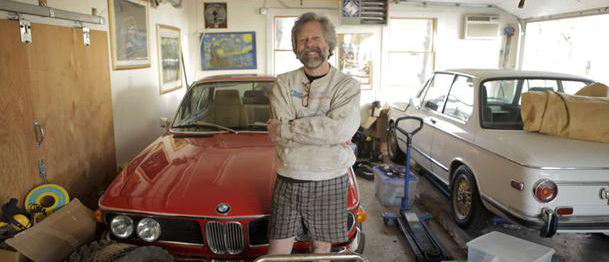
Join the Genesee Valley Chapter of the BMW CCA on July 9th for a catered lunch and a talk featuring Rob Siegel, automotive journalist, rescuer of rusty relics, diviner of dead bimmers, and automotive raconteur. Rob has been buying and repairing BMWs for the past 34 years, and his exploits have filled columns in the Roundel, the magazine of the BMW Car Club, his first book, “Memoirs of a Hack Mechanic”, and an upcoming second book, “The Hack Mechanic Guide to European Automotive Electrical Systems”.  Rob is a gifted story teller who blends equal parts humor with practical advice to discuss the adventures of owning, repairing and driving both old and new BMWs, with the odd Porsche and British cars thrown into the mix.

This event will be held from 12-3 at Berg Racing, 1660 Boulter Industrial Parkway, Webster NY 14580.  Come for lunch from 12-1 catered by Daves’ Sidewalk Café, and tour the Berg Racing facilities.  Berg Racing competes in the professional Pirelli World Challenge series, and has a complete race shop, providing everything from race set up to fabrication.   Rob Siegel will talk from 1-3, and will have his books available for purchase and signing.

Admission to lunch and the talk is free for BMW Club members who pre-register on Motorsportreg.com , and is $20 for non-members payable at the door.  Alternatively, non-members can join the BMNW CCA for $48 on-site, and get free admission along with discounts on future autocross, track days, and social events.
Registration info here

Ian

User Feedback

Create an account or sign in to leave a review

There are no reviews to display.

Account

Navigation

Search

Search

Configure browser push notifications

Chrome (Android)
  1. Tap the lock icon next to the address bar.
  2. Tap Permissions → Notifications.
  3. Adjust your preference.
Chrome (Desktop)
  1. Click the padlock icon in the address bar.
  2. Select Site settings.
  3. Find Notifications and adjust your preference.